Official vs unofficial WhatsApp API: risk and cost
Official vs unofficial WhatsApp API: understand the ban risk, the per-message cost and when each option fits your business.
Published on 4 min read
- official API
- automation
- customer support
The official WhatsApp API is the channel Meta maintains for businesses. The unofficial one imitates WhatsApp Web to send messages outside the rules. For a company that serves customers, the official API is the safe choice: the unofficial route is cheaper at first, but the number can be banned and you lose your sales channel. Here is the cost, the risk and when each one makes sense.
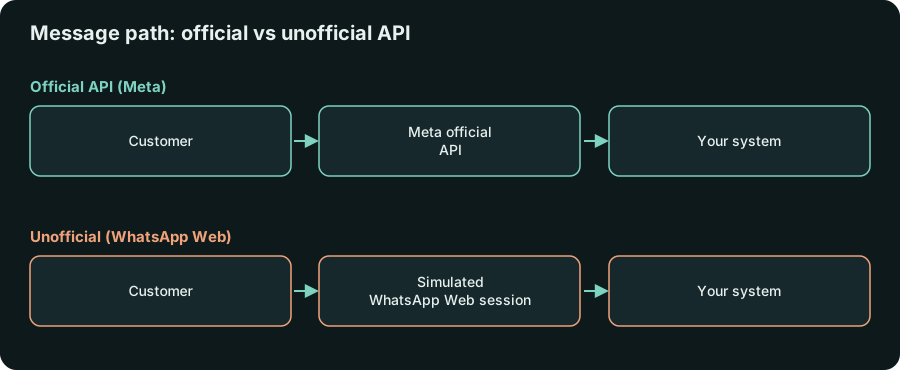
Official vs unofficial WhatsApp API: what is the difference?
The official API (the WhatsApp Business Platform, with Meta's Cloud API) is a contracted service with public rules, approved message templates and per-message pricing. The unofficial route uses libraries that simulate WhatsApp Web, such as Baileys, and behaves as if a person were using a phone.
What matters to a business: with the official API, Meta knows you exist and allows the automation. With the unofficial route, automated use goes against WhatsApp's terms.
What is the risk of the unofficial WhatsApp API?
The main risk is losing the number. When Meta detects automation patterns it blocks the account, and a number banned this way is usually hard or impossible to get back. If WhatsApp is where your customers reach you, you lose your contact history and the operation stops.
I researched this before writing, and the sources agree on the core point: the unofficial route works by reverse engineering, and the library maintainers themselves say they do not support use that breaks the terms. The ban percentages circulating online come from integrators who sell services, so I will not quote any.
How much does the official WhatsApp API cost?
The official API charges per message, and the price depends on the category (marketing, utility, authentication, service). Conversations started by the customer tend to cost less than messages the business starts. Prices change, so check the current rate card in Meta's documentation before you build a budget.
To get started you usually go through an approved provider, or set up the Cloud API directly in Meta's dashboard. You need a phone number that is not active in the regular app, and you should plan for business verification.
When does the unofficial API still make sense?
It makes sense for tests, prototypes and internal use with a disposable number, where losing the number costs nothing. It can also work for messages to yourself, such as server alerts. Even then, do not route customer data through that number: if it goes down, you lose more than the channel.
It does not make sense for serving customers, sending invoices or selling, even at small volume or for a short time. In those cases losing the channel costs more than you saved.
| Situation | Recommended channel |
|---|---|
| Customer support and sales | Official API |
| Billing and notices to customers | Official API |
| Prototype and internal test | Unofficial, disposable number |
| Internal alert to yourself | Unofficial, disposable number |
What care should you take when setting up the official API?
The official API does not protect you from everything. Meta also restricts accounts that get many reports, so careful content still matters. Four practices reduce the problem:
- Ask for consent. Send proactive messages only to people who agreed to receive them. A purchased list is the fastest way to lose account quality.
- Use clear templates. Messages the business starts outside the service window need an approved template. State the reason for the contact in the first line.
- Offer an exit. Anyone who wants to stop receiving messages should be able to do it with a simple reply.
- Watch the quality rating. Meta's dashboard shows the number's rating. If it drops, cut the volume of proactive messages before you get limited.
These cares matter even more when an AI agent talks on the company's behalf. To decide between an agent and a chatbot, read AI agent vs chatbot on WhatsApp.
How do you migrate without stopping support?
Plan it in four steps: register the company and the number with Meta, get the message templates you already use approved, run the new integration in parallel with a small group of customers, and only then turn off the old channel. The number needs attention: if it is already in the regular app, migration has its own rules, so confirm them in Meta's documentation before you touch anything.
How does this show up in my projects?
The sales agent I built for a Brazilian pharmacy chain runs on the official WhatsApp API, precisely because it serves real customers and closes orders. A legal platform I developed also uses an official API, in that case Instagram's.
I have also worked with Evolution API, an open source tool that supports both channels: the unofficial connection and Meta's Cloud API. That is an easy point to confuse. The tool does not set the risk, the channel does. What matters is which connection sits underneath.
Frequently asked questions
Do I need a registered company for the official API?
You need to register a business in Meta Business and go through verification, which asks for company details. Meta's documentation is the place to confirm the current requirements for your country and company type.
Can I keep the phone app and use the API at the same time?
That depends on recent Meta features that change often, and I could not confirm the current state in the sources I checked. Verify it in the official documentation before you plan around it.
Can I migrate from unofficial to official?
Yes, but the number currently in the regular app has to be migrated or replaced, and message templates need approval. The sooner the better, since the risk grows with volume.
Next step
If you serve customers on an unofficial channel today, treat the migration as a priority before the number gets blocked. If you are starting now, start on the official API.
Want to apply this in your business?
Tell me about your operation and I'll reply with next steps. No strings attached.
Message me on WhatsAppOr leave your details and I'll get back to you
Keep reading
5 min read
AI agent vs chatbot on WhatsApp: which one do you need?
AI agent vs chatbot for WhatsApp? See the difference, when each fits, and a real pharmacy case with a worked example.
Read article4 min read
n8n or custom code: which fits your automation?
n8n or custom code for business automation: when the visual tool is enough and when code costs less to maintain, with real cases.
Read article